See what matters
Pull the scope, missing details, and useful follow-up questions out of a customer’s request.
 Leads by Leo
Your lead. Your final say. For Thumbtack professionals
Leo sends your configured first acknowledgement, then helps you turn a customer request into clear guidance and a personalized reply. You review that reply before sending through Thumbtack.
See our selected 0-minute Thumbtack resultsCreate and verify your account. Leo checks the available plans for your business before any billing action.
Checking current plan availability. Creating an account does not start a paid subscription.
Use Leo on the web iOS in private TestFlight testing
Customer request
“I need two ceiling fans installed. I already have the fans. Are you available this week?”
Leo guidance
Confirm ceiling height and mounting details before quoting or promising a date.
Business rule: Ask for photos; quote after the scope is clear.
Editable reply
“Thanks for reaching out. Could you send a photo of each ceiling location and share the ceiling height? That will help me confirm the scope before quoting. What days work for you?”
Real results · Selected Handyman weeks
Leo sends your configured first acknowledgement. You review personalized replies before sending. These screenshots show a reported 0-minute weekly average response time on our own Thumbtack account for two selected Handyman weeks.
0minReported weekly average
HandymanSep 28–Oct 4, 2026
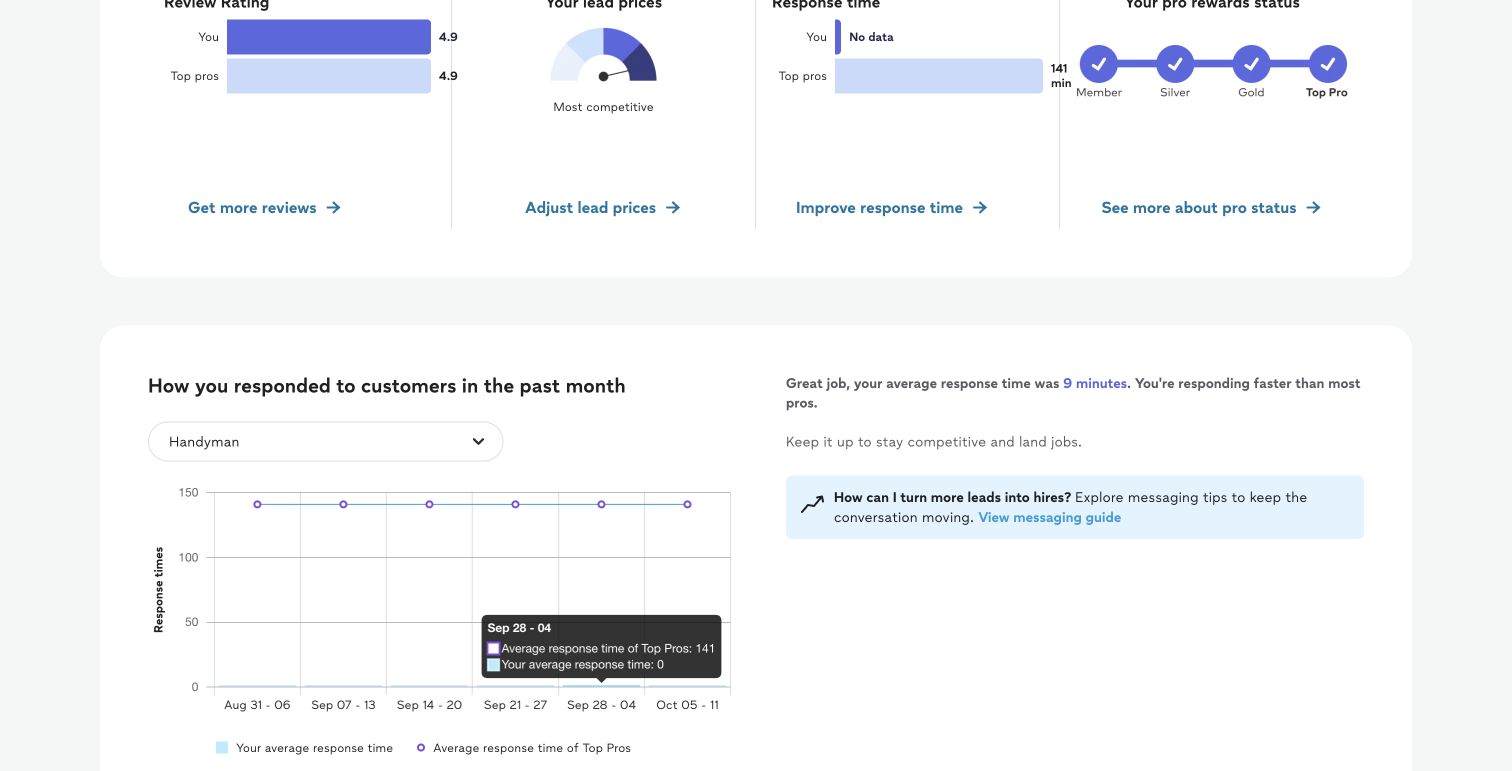
0minReported weekly average
HandymanSep 21–27, 2026
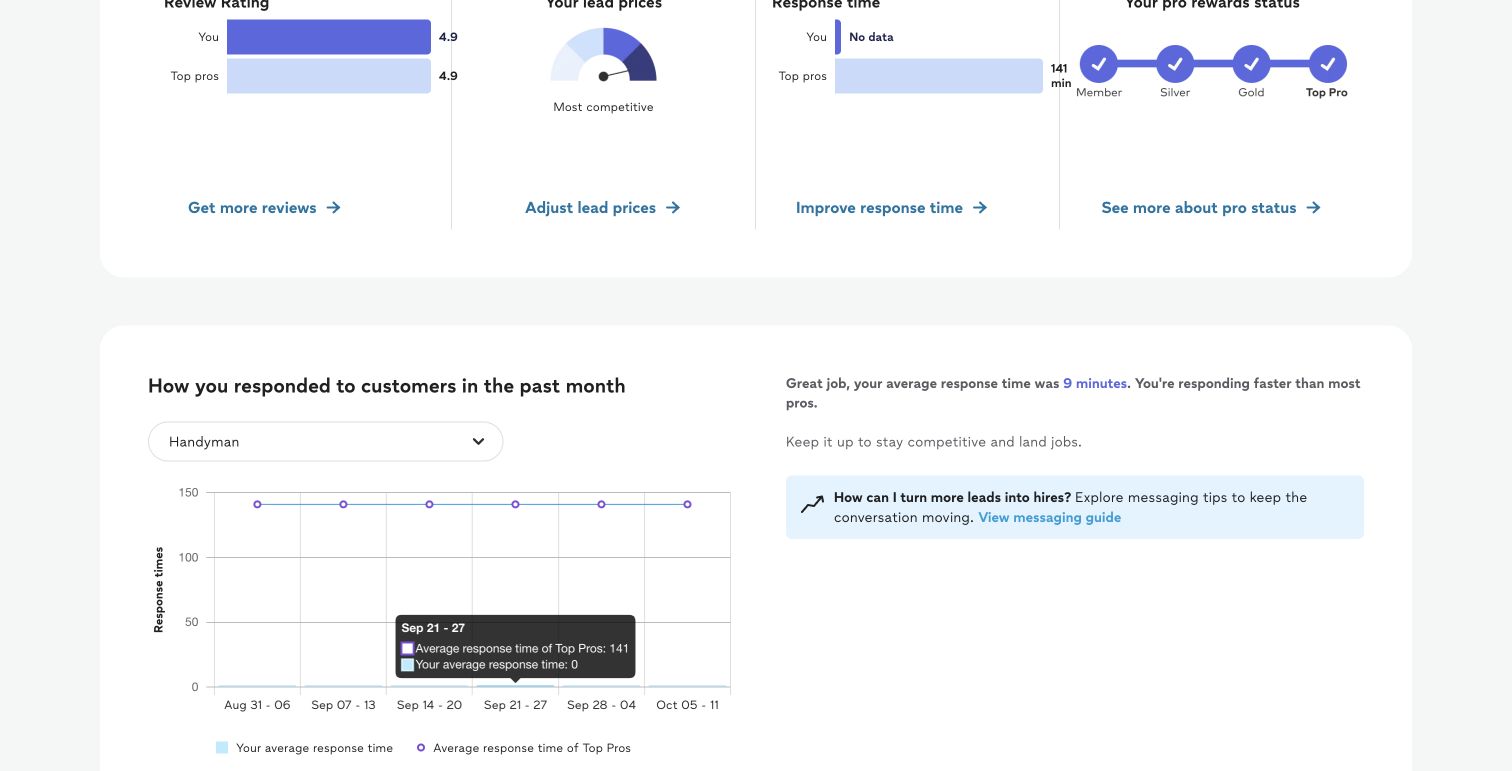
1 of 2
Selected weekly Handyman results, captured October 4, 2026. The broader category summary displayed 9 minutes at capture. Response times vary by category and period. The complete originals include that wider context.
A clearer next step
Pull the scope, missing details, and useful follow-up questions out of a customer’s request.
Give Leo your service area, minimums, and qualification rules so its guidance reflects how you work.
Start with a draft you can edit. Check the details, pricing, and promises before you send.
How it works
Read the customer’s Thumbtack request and conversation in Leo.
Leo uses your business rules to help you assess fit and decide what to ask next.
Edit the draft to match your voice and the details you can confirm.
Check the final reply and explicitly send it through Thumbtack.
Prefer to call? Use your existing phone. No number purchase or porting is required.
Monthly plans
Choose the lead allowance that fits your business. These plans include lead guidance, editable replies, and your business rules. Availability is confirmed below and again in your account.
Checking availability
$0/ month
10 leads each month
Your verified business receives Free when the service confirms this offer. No Stripe checkout or card is needed.
Start FreeChecking availability
$50/ month
50 leads each month
Review the monthly price and allowance before continuing to Stripe.
Choose LeoChecking availability
$100/ month
Unlimited leads for one Thumbtack business
Unlimited applies to one connected Thumbtack business. Existing Leo Pro subscriptions keep their original 150-lead allowance until an explicitly reviewed change.
Choose UnlimitedReview before paying. Creating an account does not start a paid subscription. New monthly paid plans have no card-based trial; you review the price and terms before continuing to Stripe. Existing Leo and Leo Pro subscriptions, earlier 7-day trials with 10 leads, and purchased lead balances keep their original terms. An existing trial renews at its agreed monthly rate unless canceled before its original end date.
One account, more room to work. Your shared account includes HandyDesk Free CRM for clients, jobs, and estimates when account access is confirmed. The 0.6% HandyDesk fee applies to eligible card payments collected through HandyDesk Free, not to creating or sending invoices.
A few things to know
Leo is a standalone product focused on lead guidance and replies for Thumbtack professionals.
Create and verify your account, then choose your business. When Free is available, the service confirms 10 leads each month for $0 with no credit card required. No paid subscription begins from account creation.
Unlimited is $100/month for one Thumbtack business. Your account confirms its availability and whether you can start a subscription or upgrade. An upgrade shows its exact current charge for your review. Existing Leo Pro subscriptions have 150 leads until a confirmed plan change.
Leo lead plans cover Thumbtack lead guidance, replies, texts, and follow-ups. Work after the lead becomes a client or job, including estimates, uses HandyDesk’s agent allowance. Existing subscriptions retain their original allowance terms.
With Free, replies pause at lead 11. With Leo, replies pause at lead 51 and you can explicitly choose an Unlimited upgrade. Monthly allowances reset each month. Repeat messages and retries stay on the same lead and do not use another lead. There are no automatic refill purchases or overage charges.
Your shared account gives you access to HandyDesk Free CRM when confirmed. Operator is $100/month and includes 50 Thumbtack leads. Operator with Unlimited is $150/month, including the $50 Unlimited addition. Shared billing reconciles existing Leo subscriptions after payment is confirmed; your current subscriptions do not change from browsing or account creation.
CallBridge is an optional $30/month package on Free or paid plans when available. It includes 500 conversation minutes, a local number where available, and no port requirement. An included HandyDesk number can be reused. Return-call forwarding shares the included minutes; lead alert calls are excluded. Alerts, voicemail transcripts, and return-call setup share a $5 monthly extras budget. They pause when that budget is exhausted; remaining talk minutes stay on your account and direct calling is available. At the limit, calling falls back to tap-to-call with no automatic extra charge. Your account confirms subscription and separate number/forwarding setup readiness.
Leo sends your configured initial acknowledgement so the customer knows their request was received. You edit and review the personalized Leo-assisted reply before sending it through Thumbtack. You make the final decision on its content, pricing, and promises.
Your services, service area, minimums, and qualification requirements help shape Leo’s guidance. For example, you might require photos or more scope details before quoting.
No. Calling opens your existing phone’s dialer. You do not need to buy or port a number. Carrier calls and texts do not synchronize into Leo.
Use Leo on the web. The Leo iOS app is in private TestFlight testing and is not available in the App Store. Android is deferred.
Leo is an independent product for professionals who use Thumbtack. It is not affiliated with or endorsed by Thumbtack.
Get ready for your next lead
Create and verify your account, then review the available plan for your business.
Account creation does not start a paid subscription. Review billing terms before paying.
Need help? Email info@handydesk.app.